
I've lost count of how many times I've opened my banking app, stared at the balance, and had absolutely no idea where the last two weeks of money actually went. That gap between "I earn a decent amount" and "I have no idea why there's nothing left" is the entire reason budgeting apps exist. It's not really about spreadsheets or willpower, it's about seeing the pattern before it becomes a problem.
What sent me down this rabbit hole again was a subscription I forgot I was paying for showing up on my statement three months running. I started testing budgeting apps not because I love finance apps as a hobby, but because I needed something that would actually flag that stuff before it happened, not after. Some of these are built for couples untangling a shared account, some are built for one person who just wants a number that says what's safe to spend today, and a couple are built around habits I didn't expect to like as much as I did.
I went through a stack of them on my own phone over the past few weeks, and below is what actually happened when I used each one, not just what the app store listing promises. If budgeting apps alone aren't cutting it and you also want your credit picture in view, I've got a companion piece on tracking your credit score that pairs well with this list.
Monarch: Budget & Track Money

Monarch is the one I'd hand to someone who already has multiple accounts scattered across banks and just wants them in one place without a headache. When I connected my checking, a credit card, and an old savings account, the auto-categorization actually got most of it right on the first pass, which is more than I can say for some of the others on this list.
What I appreciated is the choice between a stricter category budget and a looser flex budget, so I wasn't forced into one rigid system on day one. I also tried the shared-household angle, adding a second person to see how the collaboration actually works, and it didn't ask for a joint bank account to make that useful, which was the part I expected to be clunky.
There's no ad interruption anywhere in the app, which stood out after using a few free ones that constantly nudge you toward an upgrade screen. The tradeoff is straightforward: after the trial window, you're paying for that clean experience, so it's not the app to open if you just want something free forever.
Intuit Credit Karma

I'll be honest, I went into Credit Karma expecting a budgeting app and came out feeling like I'd wandered into a loan marketplace. It does show a spending summary and account connections, but so much of the interface is built around credit card recommendations and offers that the actual budgeting piece feels like an afterthought bolted onto a bigger sales funnel.
The credit score tracking is genuinely useful, I'll give it that, and getting alerted when your score shifts is handy if you're watching your credit closely. But if your goal is a clean weekly or monthly spending plan, you'll spend more time scrolling past personalized offers than looking at your actual budget.
I kept it installed for the score alerts alone, not for the budgeting itself, which tells you where this one really belongs on a list like this.
NerdWallet: Smart Money App

NerdWallet only really earns a spot here for one specific reason: the bill and subscription tracking with one-click cancellation. That part works, and it's the reason I kept coming back even after the rest of the app frustrated me.
The rest is a mixed bag, and users report the same thing I ran into: the budget layout changed at some point and lost features people relied on, like zooming out across multiple months to compare spending trends. I also hit a recurring error message more than once when I was just trying to log a few minutes of activity, which made we wonder how stable the current build actually is. Several reviewers mention ad load creeping up too, alongside repeated nudges toward the investing and cash account products layered into the app.
If you came here purely to budget, NerdWallet is not the one to build your whole system around. Use it narrowly, for the bill-cancellation feature and a free credit score check, and treat everything else as extra.
Money Manager Expense & Budget
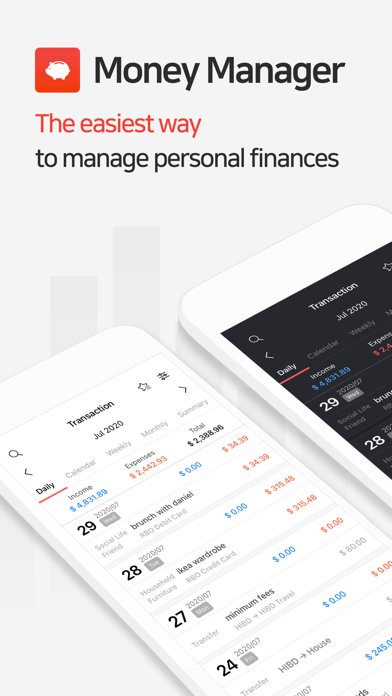
Money Manager Expense & Budget feels like it was built by someone who wanted every possible feature, and I mean that mostly as a compliment for a beginner. The default settings get you moving fast, entering an expense takes seconds, and I didn't have to configure anything before I started logging.
What surprised me was how much depth is sitting underneath that simple entry screen once you go looking for it: multiple currencies, sub-categories, a calendar view, even a PC companion that syncs over Wi-Fi so you can review the numbers on a bigger screen. None of that is forced on you early, which is exactly right for someone just starting out.
The free version caps you at ten accounts, which is plenty if you're one person with a checking and a credit card, but a household juggling several accounts will bump into that limit and need the paid unlock.
Budget Planner App – Fleur

Fleur markets itself as cute and simple, and visually it delivers, but I found myself digging past a surprising number of settings for something billed as minimal. Repeating transactions, multiple accounts, debt tracking, custom categories, insights views – it's more than the pastel interface suggests at first glance.
The upside of that is real: no sign-in requirement means you can start logging expenses the moment you open it, and iCloud sync handled moving my data between devices without any extra setup on my end. I didn't have to make an account just to try it out, which fewer apps let you do these days.
For someone who genuinely wants a lightweight daily-expense log, though, the feature list can feel like more than you asked for. It's a nice app to have, but it's not the stripped-down five-minute tool the branding implies.
Weekly: Budget Planner & Bills
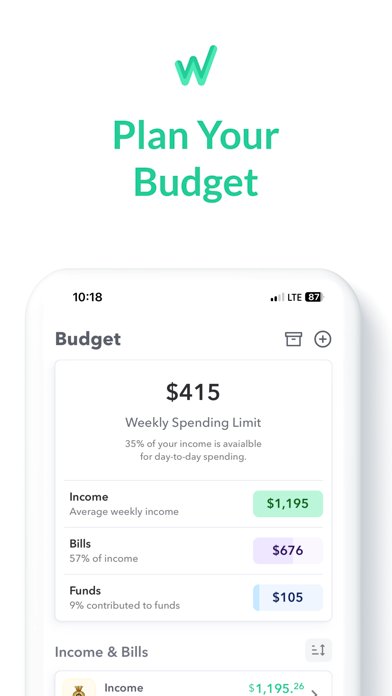
Weekly solves a narrower problem than most of the others here: it just tells you what's safe to spend this week. Once I ran through the guided setup and entered my recurring bills and a savings goal, it spat out a single weekly number and that was, honestly, the whole point.
That's a quick fix in the best sense. I didn't need to learn a new budgeting philosophy or reorganize my categories, I just needed a number I could check before deciding whether to order takeout again. The bill organizer piece tells you how many days are left until something's due, which caught an upcoming payment I'd have otherwise missed.
It leans on a subscription for the full feature set, and the free layer alone won't get you the automatic bank syncing that makes the weekly number update itself without manual entry.
YNAB

Compared to nearly everything else on this list, YNAB asks for more upfront commitment and, in my experience, pays it back if you actually stick with the method. It's built around giving every dollar an assigned job before you spend it, which is a real mental shift from the passive after-the-fact tracking that apps like Spending Tracker offer.
The debt payoff planner is where it separates itself for me, calculating actual time and interest saved rather than just showing a debt total sitting there. Multi-person plans under one subscription also make sense if you're budgeting with a partner, and the real-time sync between devices meant we weren't texting each other spreadsheet screenshots anymore.
It's not the app for someone who wants to glance at a dashboard once a month. YNAB wants weekly engagement, and if that's not the habit you're after, an app like Weekly will get you further with a lot less setup.
Spending Tracker
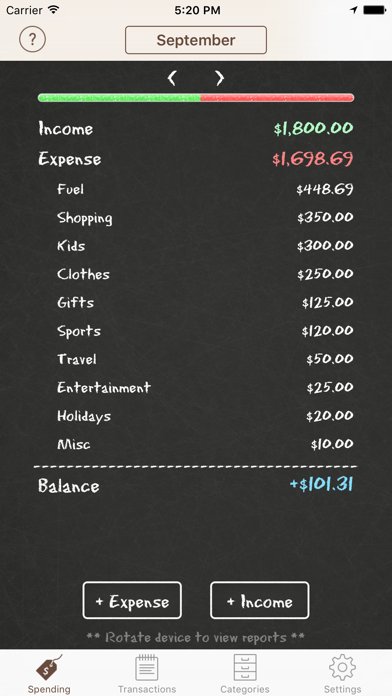
I want to like Spending Tracker more than I do, because the core idea is genuinely solid: log an expense, pick a category, see a chart, done. Setup took me under a minute and the category reports are legible without any tutorial.
But the ad experience is the real story here, and user reports back up what I ran into myself. Ads interrupt mid-entry, sometimes get stuck on screen with no visible way to close them, and a few reviewers mention not being able to export their own data without upgrading. It's the kind of friction that turns a two-minute logging habit into an annoying one.
If you can tolerate the ad load, or you're planning to pay for the Pro upgrade almost immediately, the underlying tracker is fine. If ads are a dealbreaker for you the way they were for me, this is an easy one to skip.
Conclusion: budgeting apps
"After running all of these side by side, the one I'd actually recommend to most people is Monarch, simply because it handled multiple accounts and a shared household without falling apart or nagging me with ads. If you want something narrower, Weekly is the fastest path to a single useful number, and YNAB is worth the learning curve only if you're genuinely ready to check in every week. Everything else here earns a place for one specific job, not for replacing your whole financial life."
Related app guides: expense tracker apps, subscription tracker apps, net worth tracker apps.